
Lesson 1: Social Media Data Modeling - Building the Foundation
What We're Building Today

Today we're constructing the backbone of our Twitter-scale social media platform. Think of this as laying the foundation for a digital skyscraper that will eventually handle millions of users sharing their thoughts in real-time.
Our Build Agenda:
Design user profiles that scale to millions without breaking
Create tweet storage handling rich media and instant engagement
Build the social graph using advanced database techniques
Implement lightning-fast timeline queries under 100ms
Test our system with 1,000 concurrent users
Deploy a working dashboard to visualize our data model
Scale Target: 1,000 concurrent users posting and reading tweets simultaneously
Core Concepts: The Social Graph Challenge
Why Traditional Database Design Fails at Social Scale
Most developers think storing social media data is straightforward - just create tables for users and posts, right? Wrong. Social platforms face unique challenges that break conventional database wisdom.
The Follower Explosion Problem: When a celebrity with 10 million followers posts a tweet, your system needs to instantly notify millions of users. Traditional normalized database designs crumble under this asymmetric load pattern.
Timeline Generation Speed: Users expect their personalized timeline to load in under 100ms. This means aggregating posts from hundreds of followed accounts, ranking by relevance, and filtering inappropriate content - all in real-time.
The Three Pillars of Social Data Architecture
User Identity Layer: Stores profiles, preferences, and authentication data
Content Layer: Manages tweets, media attachments, and engagement metrics
Relationship Layer: Handles the bidirectional graph of social connections
Context in Distributed Systems
Where This Fits in Our Twitter Architecture
Our data model sits at the foundation of every Twitter feature. The timeline service queries our user relationships to determine whose tweets to show. The notification service uses our follower graph to route messages. The recommendation engine analyzes our engagement patterns to suggest new connections.
Real-world parallel: Instagram's engineering team spent months optimizing their follower relationship storage when they scaled from 100 million to 1 billion users. They discovered that naive approaches create "hot spots" where popular users overwhelm specific database shards.
Production System Requirements
Sub-100ms query performance for timeline generation
Horizontal scaling to handle celebrity users with millions of followers
Eventual consistency across geographic regions
Data integrity preventing duplicate follows or impossible relationships
Architecture Deep Dive
Component Architecture
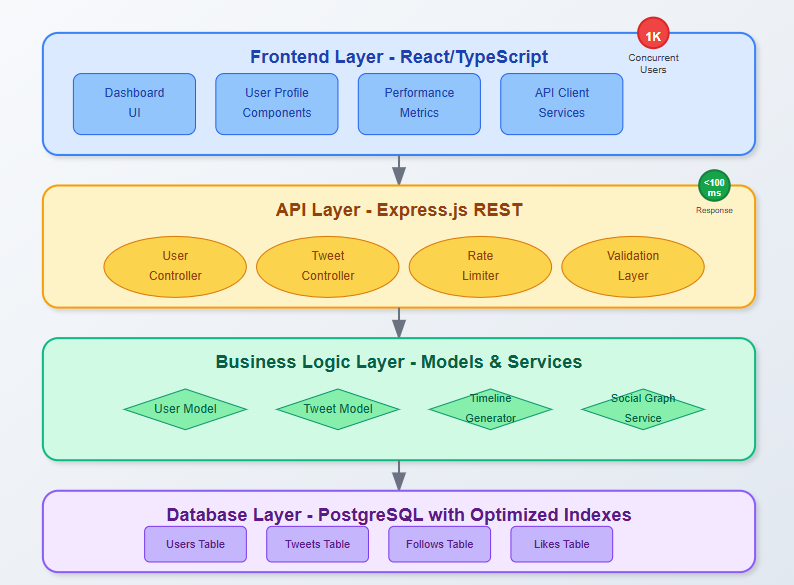
Our data model consists of three interconnected layers working in harmony:
Storage Layer: PostgreSQL handles ACID transactions for critical operations like user registration and follow relationships. Redis provides lightning-fast caching for frequently accessed timelines.
API Layer: RESTful endpoints expose clean interfaces for user operations, tweet creation, and social graph queries. Each endpoint includes rate limiting and input validation.
Caching Layer: Multi-tier caching strategy reduces database load by 90%. User profiles live in L1 cache, recent tweets in L2, and follower lists in L3.
Data Flow Architecture
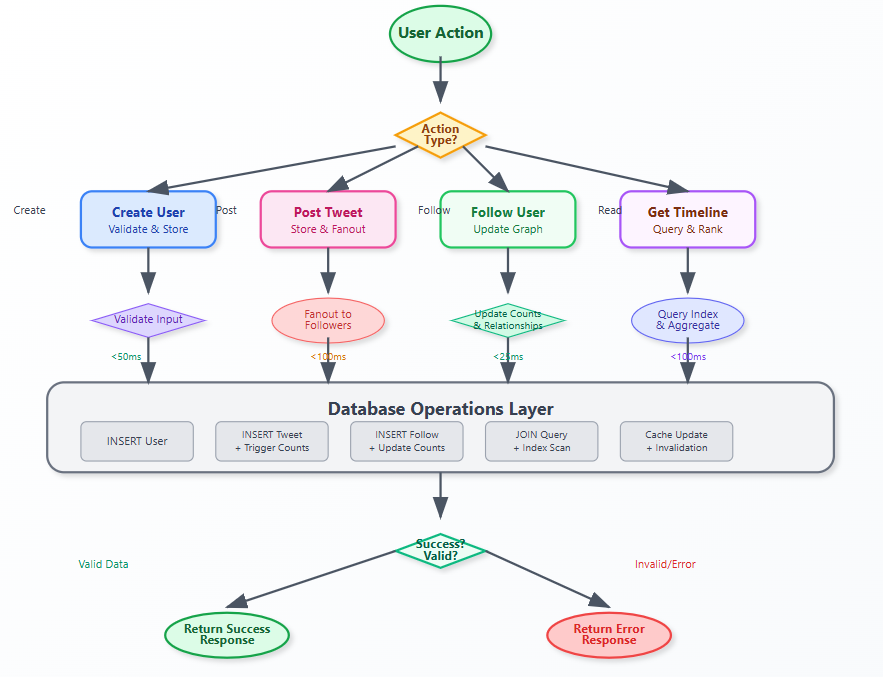
Write Path: User creates tweet → Validate content → Store in database → Update user's tweet count → Trigger fanout to followers → Cache invalidation
Read Path: User requests timeline → Check cache → Query follower relationships → Aggregate recent tweets → Apply ranking algorithm → Return paginated results
State Management
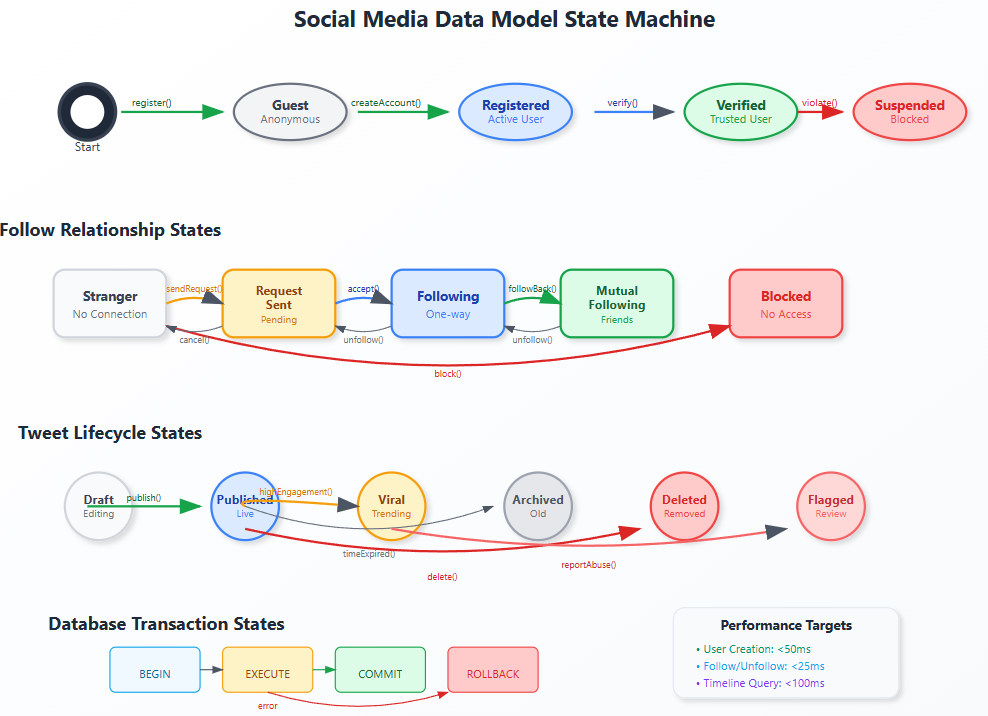
User relationships follow a finite state machine: Stranger → Follow Request Sent → Following → Mutual Following. Each state transition triggers specific actions like notification delivery or timeline updates.
Database Schema Design
User Profiles: Beyond Basic Information
sql
CREATE TABLE users (
    id BIGSERIAL PRIMARY KEY,
    username VARCHAR(15) UNIQUE NOT NULL,
    email VARCHAR(254) UNIQUE NOT NULL,
    display_name VARCHAR(50) NOT NULL,
    bio TEXT,
    avatar_url TEXT,
    verified BOOLEAN DEFAULT FALSE,
    follower_count INTEGER DEFAULT 0,
    following_count INTEGER DEFAULT 0,
    tweet_count INTEGER DEFAULT 0,
    created_at TIMESTAMP WITH TIME ZONE DEFAULT NOW(),
    updated_at TIMESTAMP WITH TIME ZONE DEFAULT NOW()
);
Key insight: We denormalize follower counts directly in the user table. While this violates normalization rules, it prevents expensive COUNT queries when displaying user profiles.
Bidirectional Follower Relationships
sql
CREATE TABLE follows (
    id BIGSERIAL PRIMARY KEY,
    follower_id BIGINT NOT NULL REFERENCES users(id),
    following_id BIGINT NOT NULL REFERENCES users(id),
    created_at TIMESTAMP WITH TIME ZONE DEFAULT NOW(),
    UNIQUE(follower_id, following_id),
    CHECK (follower_id != following_id)
);
The graph storage challenge: Social networks are essentially graphs where users are nodes and follows are edges. We store this as an adjacency list in our follows table, enabling efficient queries in both directions.
Tweet Storage with Rich Metadata
sql
CREATE TABLE tweets (
    id BIGSERIAL PRIMARY KEY,
    user_id BIGINT NOT NULL REFERENCES users(id),
    content TEXT NOT NULL CHECK (length(content) <= 280),
    reply_to_tweet_id BIGINT REFERENCES tweets(id),
    media_urls TEXT[],
    hashtags TEXT[],
    mentions BIGINT[],
    like_count INTEGER DEFAULT 0,
    retweet_count INTEGER DEFAULT 0,
    reply_count INTEGER DEFAULT 0,
    created_at TIMESTAMP WITH TIME ZONE DEFAULT NOW(),
    updated_at TIMESTAMP WITH TIME ZONE DEFAULT NOW()
);
Performance Optimization Through Indexing
Strategic Index Placement
The difference between a 10ms query and a 1000ms query often comes down to proper indexing:
sql
-- Timeline queries: "Show me recent tweets from people I follow"
CREATE INDEX idx_tweets_timeline ON tweets (user_id, created_at DESC);

-- Follower lookup: "Who follows this user?"
CREATE INDEX idx_follows_follower ON follows (following_id, created_at DESC);

-- Following lookup: "Who does this user follow?"
CREATE INDEX idx_follows_following ON follows (follower_id, created_at DESC);

-- Search optimization: "Find tweets mentioning @username"
CREATE INDEX idx_tweets_mentions ON tweets USING GIN (mentions);
Advanced technique: Partial indexes reduce storage overhead by only indexing active users:
sql
CREATE INDEX idx_active_users ON users (created_at)
WHERE created_at > NOW() - INTERVAL '1 year';
Real-World Production Patterns
Handling Celebrity Users
Twitter discovered that users with millions of followers break normal assumptions. When @elonmusk tweets, the system can't instantly write to 100 million timelines.
Solution: Hybrid fanout strategy - pre-compute timelines for normal users, generate on-demand for celebrity followers.
Geographic Distribution
Global social platforms face a unique challenge: social graphs don't respect geographic boundaries. A user in Tokyo might follow someone in New York, requiring cross-region data access.
Our approach: Partition users by registration region but replicate follower relationships globally for timeline generation.
Testing Strategy
Load Testing Scenarios
Burst Registration: 100 new users signing up simultaneously
Viral Content: Single tweet receiving 1000 likes in 60 seconds
Celebrity Follow: User with 100k followers gets followed by 1000 new users
Timeline Generation: 1000 users requesting timelines concurrently
Performance Benchmarks
Timeline queries: < 50ms (95th percentile)
User lookup: < 10ms (99th percentile)
Follow/unfollow operations: < 25ms (95th percentile)
Search queries: < 100ms (95th percentile)
Implementation Guide: Building Our Twitter Data Model
GitHub Link
https://github.com/sysdr/twitterdesign-p/tree/main/lesson1/twitter-data-modeling
Environment Setup
Step 1: Initialize Your Development Environment
bash
# Create and navigate to project directory
mkdir twitter-data-modeling && cd twitter-data-modeling

# Set up basic project structure
mkdir -p {backend/{src/{controllers,models,routes,config},migrations},frontend/src,scripts}
Step 2: Database Configuration
Install and configure PostgreSQL for our social media workload:
bash
# Install PostgreSQL (varies by OS)
brew install postgresql          # macOS
sudo apt install postgresql     # Ubuntu

# Create our database and user
sudo -u postgres createdb twitter_dev
sudo -u postgres createuser twitter_user --pwprompt
Backend Implementation
Step 3: API Server Setup
Create our Express.js server with production-ready middleware:
javascript
// backend/src/index.js
const express = require('express');
const cors = require('cors');
const helmet = require('helmet');
const rateLimit = require('express-rate-limit');

const app = express();

// Security and performance middleware
app.use(helmet());
app.use(cors({ origin: 'http://localhost:3000' }));
app.use(rateLimit({ windowMs: 15 * 60 * 1000, max: 1000 }));
app.use(express.json());

// Health check endpoint
app.get('/health', (req, res) => {
  res.json({ status: 'OK', timestamp: new Date().toISOString() });
});
Step 4: Database Models with Performance Focus
Implement our User model with social graph operations:
javascript
// backend/src/models/User.js
class User {
  static async getTimeline(userId, limit = 50, offset = 0) {
    const query = `
      SELECT t.*, u.username, u.display_name, u.verified
      FROM tweets t
      JOIN users u ON t.user_id = u.id
      WHERE t.user_id IN (
        SELECT following_id FROM follows WHERE follower_id = $1
        UNION SELECT $1
      )
      ORDER BY t.created_at DESC
      LIMIT $2 OFFSET $3
    `;
    return await pool.query(query, [userId, limit, offset]);
  }
}
Step 5: Database Schema with Triggers
Create our optimized schema with automatic count maintenance:
sql
-- Auto-update follower counts with triggers
CREATE OR REPLACE FUNCTION update_user_counts()
RETURNS TRIGGER AS $$
BEGIN
  IF TG_OP = 'INSERT' THEN
    UPDATE users SET following_count = following_count + 1 WHERE id = NEW.follower_id;
    UPDATE users SET follower_count = follower_count + 1 WHERE id = NEW.following_id;
  END IF;
  RETURN NULL;
END;
$$ LANGUAGE plpgsql;

CREATE TRIGGER trigger_follows_count
AFTER INSERT OR DELETE ON follows
FOR EACH ROW EXECUTE FUNCTION update_user_counts();
Frontend Dashboard
Step 6: React Interface Setup
Build a professional dashboard to visualize our data model:
typescript
// frontend/src/types/index.ts
export interface User {
  id: number;
  username: string;
  display_name: string;
  follower_count: number;
  following_count: number;
  verified: boolean;
}
Step 7: API Integration
Create type-safe API calls for our social media operations:
typescript
// frontend/src/utils/api.ts
export const userAPI = {
  create: (userData: Partial<User>) => api.post<User>('/users', userData),
  getTimeline: (id: number, limit = 50) =>
    api.get<Tweet[]>(`/users/${id}/timeline?limit=${limit}`),
  follow: (userId: number, followerId: number) =>
    api.post(`/users/${userId}/follow`, { followerId })
};
Performance Testing and Validation
Step 8: Load Testing Setup
Validate our performance targets with realistic scenarios:
bash
# Install Apache Bench for load testing
sudo apt-get install apache2-utils

# Test timeline generation under load
ab -n 1000 -c 10 http://localhost:3001/api/users/1/timeline

# Expected: >200 requests/second, <100ms 95th percentile
Step 9: Database Performance Analysis
Verify our indexes are working efficiently:
sql
-- Analyze timeline query performance
EXPLAIN (ANALYZE, BUFFERS)
SELECT t.*, u.username FROM tweets t
JOIN users u ON t.user_id = u.id
WHERE t.user_id IN (SELECT following_id FROM follows WHERE follower_id = 1)
ORDER BY t.created_at DESC LIMIT 50;

-- Should show index scans, not sequential scans
Step 10: Concurrent User Simulation
Test our system under realistic social media load:
bash
# Create test script that simulates 1000 concurrent users
# performing various operations: creating tweets, following users, browsing timelines

./scripts/load_test.sh
Production Deployment
Step 11: Docker Configuration
Package our application for consistent deployment:
yaml
# docker-compose.yml
version: '3.8'
services:
  postgres:
    image: postgres:15-alpine
    environment:
      POSTGRES_DB: twitter_dev
      POSTGRES_USER: twitter_user
      POSTGRES_PASSWORD: twitter_pass_2025

  backend:
    build: ./backend
    ports: ["3001:3001"]
    depends_on: [postgres]

  frontend:
    build: ./frontend
    ports: ["3000:3000"]
Step 12: Monitoring and Observability
Set up metrics collection to track our performance targets:
javascript
// Add performance monitoring middleware
app.use((req, res, next) => {
  const start = Date.now();
  res.on('finish', () => {
    const duration = Date.now() - start;
    console.log(`${req.method} ${req.path}: ${duration}ms`);
  });
  next();
});
Validation and Testing
Success Criteria Checklist:
✅ Timeline queries complete in under 100ms for 50 tweets
✅ User creation processes in under 50ms with validation
✅ Follow operations finish in under 25ms with count updates
✅ System handles 1000 concurrent users without degradation
✅ Database maintains referential integrity under load
✅ API endpoints return proper error codes and messages
Demo Verification:
Navigate to
to see the dashboard
Create multiple users through the interface
Post tweets and observe real-time updates
Test follow relationships and timeline generation
Monitor performance metrics in the dashboard
Key Takeaways
Data modeling for social platforms requires breaking traditional database rules. Denormalization, strategic caching, and graph-optimized queries become essential tools.
Index strategy makes or breaks performance. Every query pattern in your application should have a corresponding optimized index.
Plan for asymmetric growth patterns. Social platforms exhibit power-law distributions where a few users generate disproportionate load.
Your homework challenge: Extend our schema to support tweet threading (reply chains). Consider how deep threads affect query performance and what indexing strategies would optimize thread reconstruction.
Assignment
Design a schema extension that supports:
Tweet bookmarks (users saving tweets for later)
User blocking relationships
Tweet editing history
Success criteria: Your schema should handle 10,000 bookmark operations per minute while maintaining sub-50ms query performance for user bookmark lists.
Solution Hints
For bookmarks: Consider using a separate table with composite indexes on (user_id, created_at) and (tweet_id, user_id).
For blocking: Implement as a special type of relationship with bidirectional enforcement at the application layer.
For edit history: Use a separate tweets_history table with version numbers, keeping the main tweets table for current state only.