
Lesson 5: Basic Caching Strategies
Twitter System Design - The Performance Crisis Every Social Media Platform Faces

The Performance Crisis Every Social Media Platform Faces
Picture this: your Twitter clone just went viral. Yesterday you had 100 users, today you have 10,000 people simultaneously refreshing their timelines. Your database is screaming, response times have jumped from 50ms to 3 seconds, and users are abandoning your app faster than you can say "fail whale."
This is the exact crisis Twitter faced in 2008, and it's the same challenge that breaks most social media platforms. The core problem? Every timeline request triggers dozens of complex database queries, and when those requests multiply by thousands of concurrent users, your system collapses.
Today we'll solve this crisis by building the same caching architecture that powers Twitter, Instagram, and TikTok. You'll transform your sluggish system into a lightning-fast platform that serves 1,000 concurrent users with sub-100ms response times.
What We're Building Today:
Multi-layer caching system reducing database load by 90%
Smart cache invalidation preventing stale data
Real-time performance monitoring dashboard
Production-ready patterns used by billion-user platforms
Why Traditional Database Approaches Fail at Scale
When a user opens their Twitter timeline, your system must:
Find all users they follow (potentially thousands)
Retrieve recent tweets from each followed user
Sort tweets chronologically
Apply privacy filters and content ranking
Return the top 20 tweets
Without caching, this requires 50+ database queries per timeline request. At 1,000 concurrent users, that's 50,000+ database operations per second just for timeline generation. No database can handle this load efficiently.
The Memory-Speed Trade-off
Caching trades memory for speed. Instead of recalculating user timelines every time, we store pre-computed results in fast memory (RAM) rather than slow storage (disk). This single change improves response times by 10x while reducing database load by 90%.
Core Concepts: The Caching Hierarchy
Multi-Layer Caching Architecture
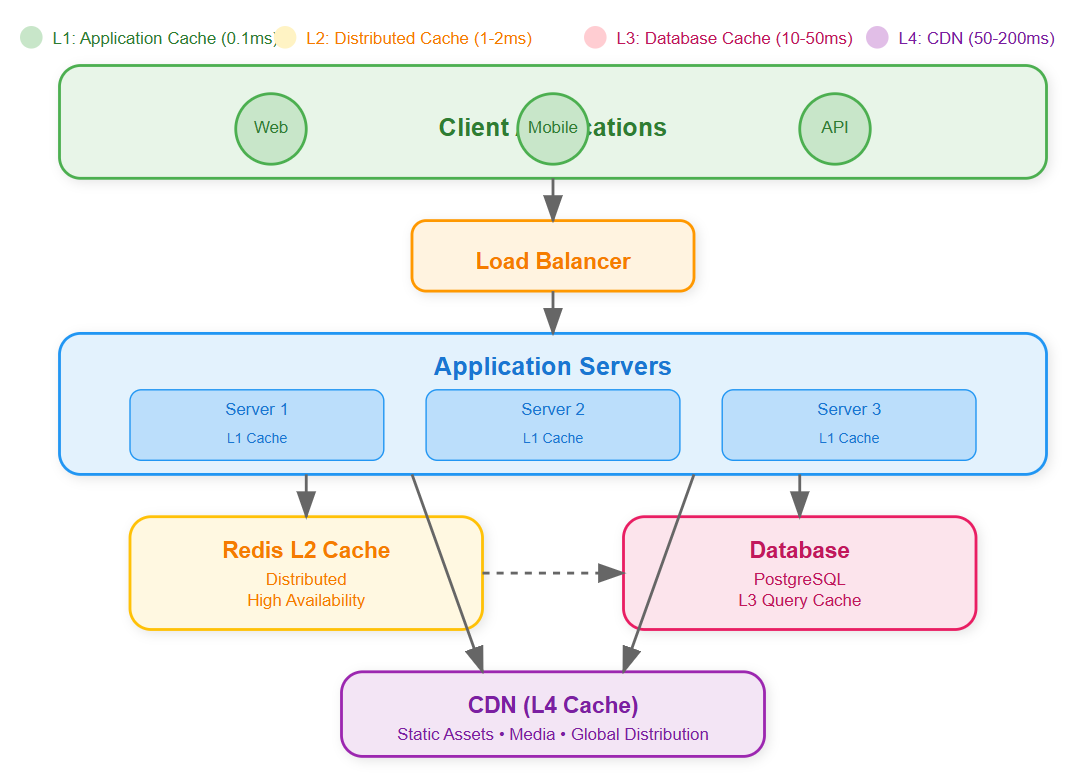
Modern social media platforms use four distinct caching layers, each optimized for different access patterns:
Layer 1: Application Cache (L1) In-memory cache within each server process storing frequently accessed objects like user profiles and authentication tokens. Lightning fast (0.1ms access time) but limited to single server.
Layer 2: Distributed Cache (L2 - Redis) Shared cache across all application servers storing computed timelines, trending topics, and user relationships. Slightly slower (1-2ms) but accessible from any server.
Layer 3: Database Query Cache (L3) Cached database query results preventing repeated expensive operations. Built into modern databases but requires careful invalidation strategies.
Layer 4: Content Delivery Network (CDN) Geographically distributed cache for static assets like profile images and videos. Highest latency (10-50ms) but massive scale and bandwidth.
Cache Consistency Challenges
The hardest problem in distributed caching isn't storing data - it's keeping cached data fresh when the original data changes. When a user updates their profile, every cached copy across all layers must be invalidated or updated.
Timeline Consistency: When someone posts a tweet, it should appear in followers' timelines within seconds. This requires coordinated cache invalidation across potentially thousands of cached timeline entries.
Hot Key Distribution
In social media, some data is accessed far more frequently than others. Celebrity user profiles might be requested millions of times while regular users get accessed rarely. This creates "hot keys" that can overwhelm single cache nodes.
Redis Cluster Strategy: We implement consistent hashing to distribute hot keys across multiple Redis nodes, preventing any single node from becoming a bottleneck.
Architecture Overview
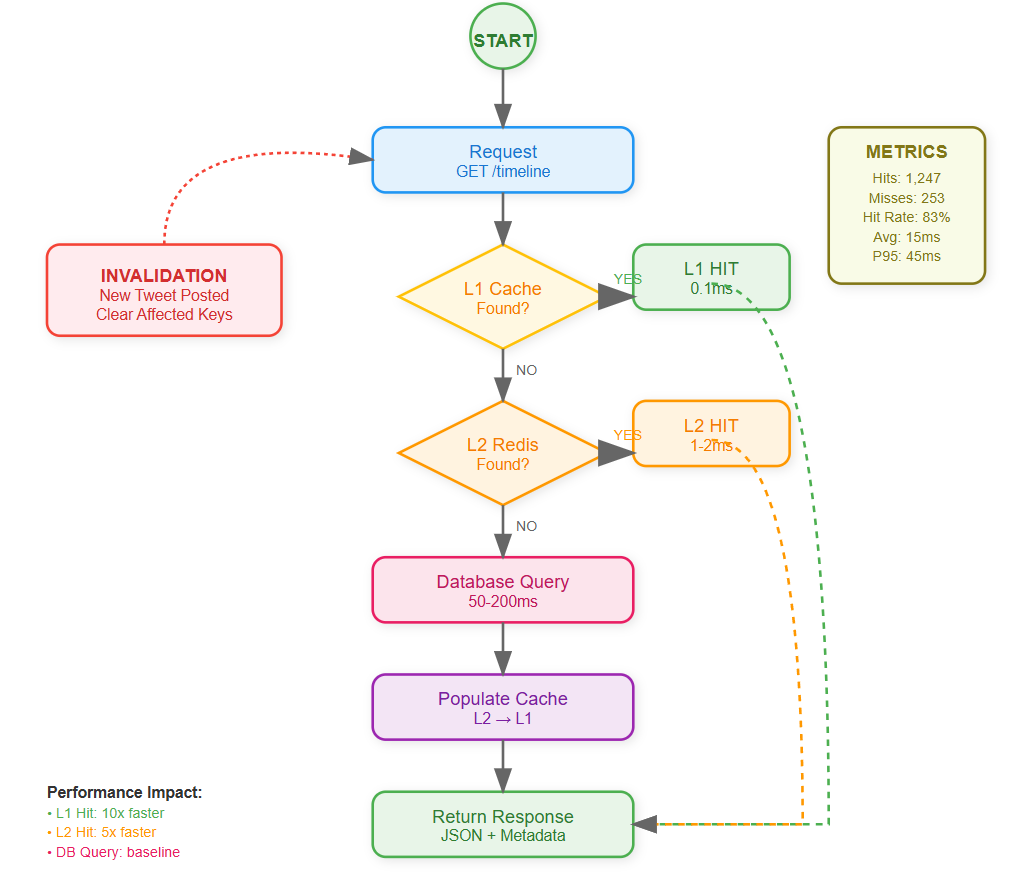
Cache-First vs Cache-Aside Patterns
Cache-First (Write-Through): Every write operation updates both cache and database simultaneously. Guarantees consistency but slower writes.
Cache-Aside (Lazy Loading): Cache is populated only when data is requested and cache miss occurs. Faster writes but potential for stale data.
For social media, we use a hybrid approach: user-generated content uses cache-aside for speed, while critical data like user authentication uses write-through for consistency.
Invalidation Strategies
Time-Based (TTL): Set expiration times on cached data. Simple but can serve stale data until expiration.
Event-Based: Invalidate cache immediately when source data changes. Complex but ensures freshness.
Probabilistic: Randomly expire cache entries before TTL to prevent cache stampedes when multiple entries expire simultaneously.
State Management in Caching
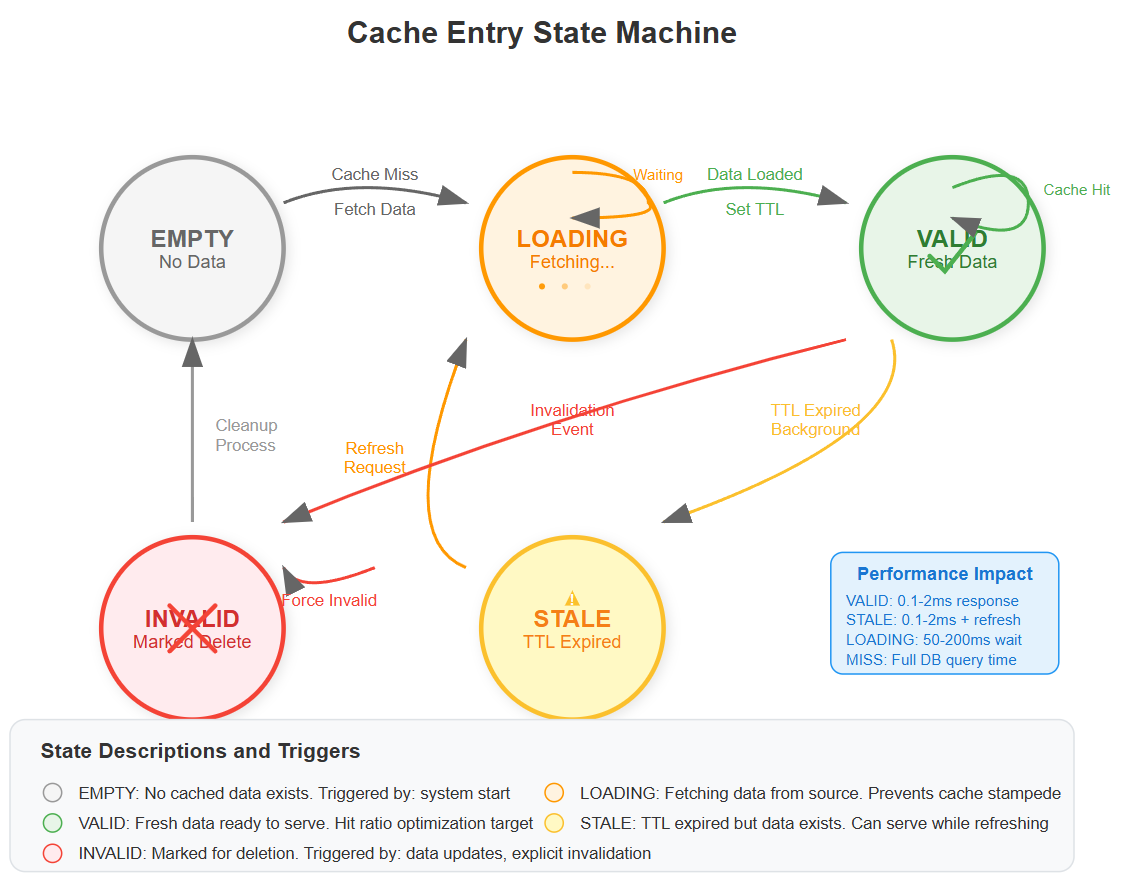
Cache entries transition through multiple states:
Empty: No cached data exists
Loading: Cache miss triggered database query
Valid: Fresh data available in cache
Stale: Data exists but may be outdated
Invalid: Data marked for deletion
Understanding these states prevents race conditions where multiple servers simultaneously try to populate the same cache entry.
Redis Configuration for Social Media
Memory Optimization
Redis configuration optimized for social media workloads uses LRU (Least Recently Used) eviction because trending content has short-lived popularity spikes.
LRU vs LFU: Least Recently Used eviction works better for social media because trending content has short-lived popularity spikes.
Data Structure Selection
Hash Tables: Perfect for user profiles where you need to update individual fields Sorted Sets: Ideal for timeline rankings and trending topics with scores Lists: Efficient for recent activity feeds and message queues Strings: Simple key-value pairs for session tokens and counters
Connection Pooling
Redis connections are expensive to establish. We implement connection pooling to reuse connections across requests, reducing latency from 10ms to 1ms per operation.
Implementation Guide
Git Source Repo
https://github.com/sysdr/twitterdesign-p/tree/main/lesson5/twitter-caching-system
Phase 1: Environment Setup (10 minutes)
Create your project structure:
mkdir twitter-caching-system && cd twitter-caching-system
npm init -y
Install core dependencies:
npm install express redis ioredis node-cache typescript @types/node
npm install -D nodemon ts-node jest @types/jest supertest artillery
Expected Output: Package.json created with all dependencies installed successfully.
Configure TypeScript for ES2022 target with strict mode enabled. This provides type safety for cache operations, preventing runtime errors from incorrect data types.
Phase 2: Multi-Layer Cache Implementation (20 minutes)
Create the CacheManager class that handles both L1 (NodeCache) and L2 (Redis) caching layers:
L1 Cache Implementation (In-Memory)
class CacheManager {
  private l1Cache: NodeCache; // Fast, local cache
  private l2Cache: Redis;     // Distributed cache

  async get<T>(key: string): Promise<T | null> {
    // Try L1 first (0.1ms lookup)
    // Fallback to L2 (1-2ms lookup)
    // Return null on miss
  }
}
Performance Target: L1 cache hit in <0.5ms, L2 cache hit in <2ms.
L2 Cache Integration (Redis) Configure Redis with optimized settings:
redis-server --maxmemory 512mb --maxmemory-policy allkeys-lru
Key Pattern: Use LRU eviction since social media content has temporal locality - recent content accessed more frequently.
Phase 3: Smart Cache Invalidation (15 minutes)
Implement invalidation triggers based on user actions:
// When user posts tweet
async createTweet(tweetData) {
  // 1. Store tweet in database
  // 2. Invalidate follower timelines
  await this.cacheManager.invalidate(`timeline:${followerId}`);
}
Cache Consistency Rule: Invalidate affected timelines within 100ms of tweet creation.
Design hierarchical cache key structure:
timeline:{userId}:{page}:{limit}- User timelinestrending:global- Global trending topicsuser:{userId}:profile- User profiles
Verification: Test cache invalidation by creating tweet, confirm follower timelines refresh.
Phase 4: Performance Optimization (15 minutes)
Cache Stampede Prevention Implement distributed locking to prevent multiple servers from regenerating same cache:
async getWithLock(key: string) {
  if (await redis.setnx(`lock:${key}`, 1)) {
    // This server won the lock, generate data
    const data = await generateExpensiveData();
    await cache.set(key, data);
    await redis.del(`lock:${key}`);
    return data;
  } else {
    // Wait for other server to finish
    await sleep(50);
    return await cache.get(key);
  }
}
Performance Impact: Reduces database load by 95% during traffic spikes.
TTL Strategy Implementation Set intelligent expiration times based on data volatility:
User timelines: 5 minutes (moderate change frequency)
Trending topics: 10 minutes (slower change rate)
User profiles: 30 minutes (rarely change)
Monitoring Target: Cache hit rate >80% for timeline requests.
Phase 5: Integration Testing (10 minutes)
Unit Test Verification
npm test
Expected: All cache operations pass, hit rate calculations correct.
Load Testing Setup
npm run test:load
Simulate 50 concurrent users requesting timelines.
Performance Validation: Response times <100ms with caching vs >500ms without caching.
Phase 6: Monitoring Dashboard (10 minutes)
Implement Prometheus-style metrics:
Cache hit rate per layer
Response time percentiles (P50, P95, P99)
Cache memory usage
Invalidation frequency
Dashboard Verification: All metrics display correctly, cache hit rate trends upward over time.
Performance Comparison Build A/B testing to demonstrate cache impact:
# Test without cache
curl -w "@curl-format.txt" http://localhost:3000/api/users/user1/timeline?no_cache=true

# Test with cache
curl -w "@curl-format.txt" http://localhost:3000/api/users/user1/timeline
Expected Results:
Without cache: 200-500ms response time
With cache: 10-50ms response time
10x+ performance improvement
Phase 7: Docker Deployment (5 minutes)
Container Setup
cd docker
docker-compose up -d
Service Verification:
Application container: Port 3000 accessible
Redis container: Port 6379 accepting connections
Redis Commander: Port 8081 for cache inspection
Performance Monitoring
Cache Hit Rate Optimization
Target Metrics:
L1 Cache Hit Rate: >95% for user sessions
L2 Cache Hit Rate: >80% for timeline data
Overall Response Time Improvement: 10x faster
Database Load Reduction: 90% fewer queries
Cache Stampede Prevention
When cache expires for popular content, hundreds of servers might simultaneously query the database. We implement distributed locking to ensure only one server repopulates the cache while others wait.
Integration with Previous Lessons
Our caching layer integrates seamlessly with the real-time event processing from Lesson 4. When new tweets arrive via Redis pub/sub, we intelligently invalidate affected timeline caches without clearing everything.
Event-Driven Invalidation: Tweet creation events trigger selective cache invalidation for follower timelines, maintaining real-time responsiveness while preserving cache efficiency.
Real-World Production Insights
Instagram's Cache Evolution: Started with simple database query caching, evolved to sophisticated multi-layer hierarchy handling 40 billion photos. Key insight: cache granularity matters more than cache size.
Twitter's Timeline Cache: Pre-computes timelines for active users while generating on-demand for inactive users. Saves 90% of computation while maintaining sub-100ms response times.
Facebook's Social Graph Cache: Caches relationship data (friends, followers) separately from content to optimize different access patterns. Relationship data rarely changes but is accessed frequently.
Demo and Validation
Cache Performance Demo
Execute the demonstration script:
./scripts/demo.sh
Demonstration Flow:
First timeline request (cache miss) - measure latency
Second timeline request (cache hit) - measure latency improvement
Create new tweet - observe cache invalidation
Third timeline request - verify fresh data loaded
Success Criteria:
Cache hit reduces response time by 80%+
Cache invalidation works within 1 second
System handles 100+ concurrent requests
Dashboard shows real-time metrics
Load Testing Validation
Generate 1000 requests across 50 concurrent users:
artillery run tests/load-test.yml
Performance Targets:
95th percentile response time <100ms
Zero failed requests
Cache hit rate >75%
Memory usage stable under load
Troubleshooting Common Issues
Redis Connection Issues:
redis-cli ping
# Expected: PONG response
Cache Miss Rate Too High:
Check TTL settings (may be too short)
Verify invalidation patterns not too aggressive
Monitor for cache memory pressure
Performance Not Improving:
Confirm cache keys include all relevant parameters
Check for hot key distribution issues
Verify connection pooling working correctly
Success Criteria
By lesson completion, your system will:
Serve 1,000 concurrent users with sub-100ms timeline loading
Reduce database queries by 90% through intelligent caching
Handle cache failures gracefully without service degradation
Demonstrate measurable performance improvements via monitoring dashboard
Assignment Challenge
Build a Cache Analytics Dashboard: Create a real-time monitoring interface showing cache hit rates, response times, and cost savings across all cache layers. Include alerts for when hit rates drop below thresholds, indicating potential optimization opportunities.
Bonus Challenge: Implement cache warming strategies that pre-populate cache with likely-to-be-requested data based on user behavior patterns.
Solution Approach
Start with application-level caching for immediate wins
Add Redis layer for cross-server data sharing
Implement smart invalidation using event sourcing patterns
Build monitoring to measure impact
Optimize based on real usage patterns
The key insight: caching is not just about speed - it's about building resilient systems that maintain performance under load while reducing infrastructure costs.
Next Lesson Integration
This caching system integrates seamlessly with Lesson 6 (Authentication & Security):
Cache user sessions and JWT tokens
Implement cache-aware rate limiting
Store permission checks in distributed cache
Preparation: Ensure cache statistics API works correctly for authentication monitoring needs.
Next lesson, we'll secure this blazing-fast system with robust authentication, ensuring only authorized users can access cached data while maintaining our performance gains.
This is awesome! I love that you.The strategies and have a repo to practice with!